Tutorial#
Using an existing card game#
pygame_cards provides you with a base set of cards.
If you don’t care about how one can create cards, jump to Your First Card Game
Creating a new card game#
The tutorial of pygame_cards will show you how to make a simple card game.
As an example we will create a small minions game. It will be something a bit similar to hearthstone.
Creating your cards#
First we will focus on designing our cards.
Inheriting from the Abstract Class#
You need to define some fields for your card.
You can do that by inheriting from AbstractCard .
It has only one mandatory argument which is name but we can add many others.
See the script below that generates a minion for you.
# Import the abstact card class
from pygame_cards.abstract import AbstractCard

from dataclasses import dataclass


@dataclass
class MinionCard(AbstractCard):
    """A card that represent a minion.

    A minion has a health, an attack and a cost.
    """

    health: int
    attack: int
    cost: int

    description: str = ""


if __name__ == "__main__":
    card = MinionCard(
        name="Frodo the Hobbit",
        health=6,
        attack=2,
        cost=3,
        description=(
            "Frodo's name comes from the Old English name Fróda, "
            "meaning 'wise by experience'"
        ),
    )

    print(card)
If you are not familiar with
dataclasses
you can just
think that it helps you create instances as it creates the __init__()
for you.
We can see the the output of this script gives us
MinionCard(name='Frodo the Hobbit', u_id=0, health=6, attack=2, cost=3)
We can see that a u_id field was created for us.
This is used to track every instance of a Card that is created during the
execution of the game.
Creating a set of Cards#
Now that we know how to create a card, we want to create all the content we want.
For that we will use the Class CardsSet.
You can use it like a python list:
from minion_card import MinionCard
from pygame_cards.set import CardsSet


MY_COMMUNITY_OF_THE_RING = CardsSet(
    [
        MinionCard("Bilbo", 5, 2, 2),
        MinionCard("Gandalf", 10, 6, 8),
        MinionCard("Sam", 7, 1, 2),
    ]
)

print(MY_COMMUNITY_OF_THE_RING)
Usually you will want to save your data in files instead of writing it
directly in python. For that you can use the pygame_cards.load.from_json()
method.
Note
If you need specific capabilities in your CardSet based on your cards, you can inherit from this class and create your own.
Adding Graphics#
Now we are going to create graphics for our game. When you do graphics, you will need some files for the content. Just make sure that you don’t used any copyrighted files you are not allowed to.
For this tutorial, we will use two sources: 1. pygame_emojis for the different art on the cards. 2. DALL-E 2 to produce some images of the lotr characters.
Let’s start by thinking what we want on the card. It is always a good idea to make a drawing first.
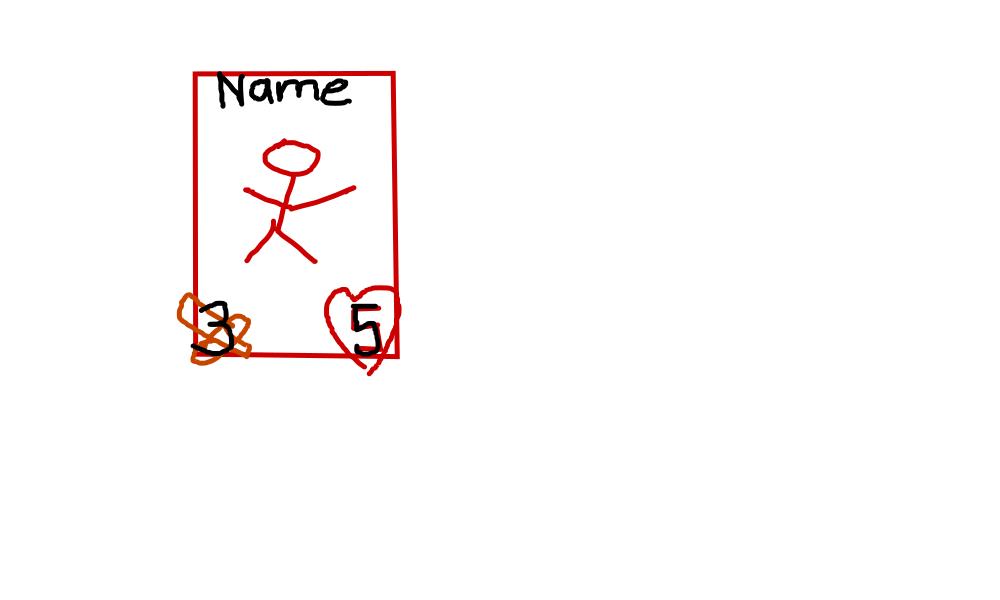
So basically attack and health points on the corners, the name on top and an image in the middle of the card.
Let’s now create the code for that.
We again can use the object oriented API to create a graphics object
suiting our need.
We will inherit from
AbstractCardGraphics.
This class simply needs a surface() property.
We use python cached_property() so that once the
suface is created it will be used all the time and does not need to be
recreated at every game frame.
from dataclasses import dataclass
from functools import cached_property
from pathlib import Path
import sys
from time import sleep
import pygame
from examples.tutorial.minion_card import MinionCard

from pygame_emojis import load_emoji

# Again, we start from the abstract graphics
from pygame_cards.abstract import AbstractCardGraphics

# Import the cards we just created
from minion_set import MY_COMMUNITY_OF_THE_RING
from pygame_cards.utils import position_for_centering


@dataclass
class MinionCardGraphics(AbstractCardGraphics):
    """A Grphics card for our lotr characters."""

    # Specify the type of card that this graphics accept
    card: MinionCard

    # This will be the file where the character is
    filepath: Path = None

    @cached_property
    def surface(self) -> pygame.Surface:
        # Size is a property from AbstractCardGraphics
        x, y = self.size

        # Create the surface on which we will plot the card
        surf = pygame.Surface(self.size)

        if self.filepath is not None:
            # Load the image of our character
            picture = pygame.image.load(self.filepath)
            # Rescale it to fit the surface
            surf.blit(pygame.transform.scale(picture, self.size), (0, 0))

        # Create the name on top using pygame fonts
        font = pygame.font.SysFont("urwgothic", 48)
        name = font.render(self.card.name, True, pygame.Color(163, 146, 139))

        # Make sure the name is centered in the x direction.
        surf.blit(name, (position_for_centering(name, surf)[0], 10))

        # Add some emojis for health and attack
        emoji_size = (100, 100)
        attack_emoji = load_emoji("⚔️", emoji_size)
        life_emoji = load_emoji("♥️", emoji_size)

        emoji_border_offset = 5
        surf.blit(
            attack_emoji,
            # Do a bit of maths to guess the position
            (
                emoji_border_offset,
                self.size[1] - emoji_border_offset - emoji_size[1],
            ),
        )
        surf.blit(
            life_emoji,
            (
                self.size[0] - emoji_border_offset - emoji_size[0],
                self.size[1] - emoji_border_offset - emoji_size[1],
            ),
        )

        return surf


for card in MY_COMMUNITY_OF_THE_RING:
    # Select the good file for each Card.
    match card.name:
        case "Bilbo":
            file = (
                "DALL·E 2022-08-30 20.58.30 - frodo from lotr being obsessed with the"
                " ring, digital art.png"
            )
        case "Gandalf":
            file = (
                "DALL·E 2022-08-30 20.59.25 - gandalf from lotr looking very wise on"
                " his horse, digital art.png"
            )
        case "Sam":
            file = (
                "DALL·E 2022-08-30 21.01.56 - sam the hobbit from lotr sharing some"
                " elven bread, digital art.png"
            )
        case _:
            raise ValueError(f"Unkonwn character {card.name}")

    card.graphics = MinionCardGraphics(
        card,
        filepath=Path("images", file),
    )

if __name__ == "__main__":
    # A very simple game loop to show the cards
    pygame.init()

    size = width, height = 1000, 500

    screen = pygame.display.set_mode(size)
    screen.fill("black")

    for i, card in enumerate(MY_COMMUNITY_OF_THE_RING):
        position = (50 + i * (100 + card.graphics.size[0]), 100)

        # Simply blit the card on the main surface
        screen.blit(card.graphics.surface, position)

    # Save images for the documentation
    pygame.image.save(
        screen,
        Path("images", f"card_from_tuto.png"),
    )

    while 1:
        for event in pygame.event.get():
            if event.type == pygame.QUIT:
                sys.exit()

        pygame.display.flip()

        # Make sure you don't burn your cpu
        sleep(1)
So we created a graphics for the cards and displayed it on the screen.
Let’s see the result:
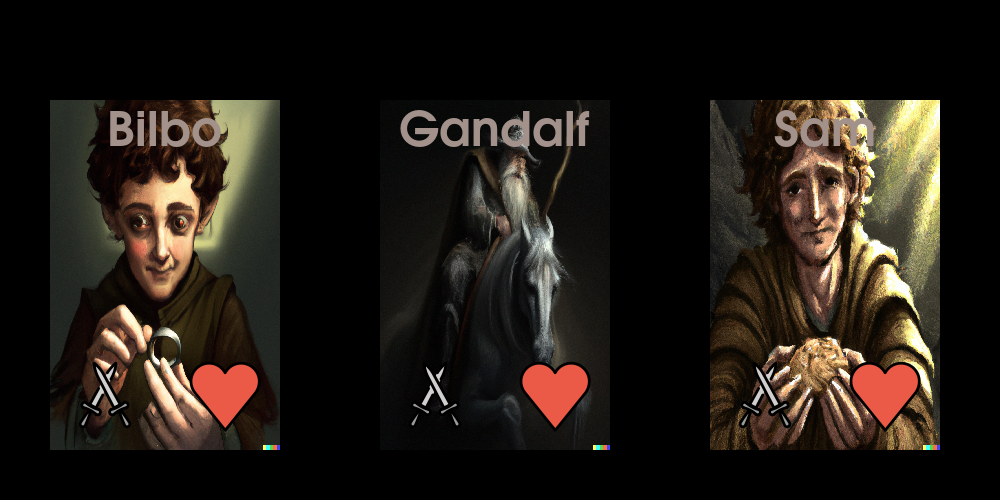
Okay, this is quite ugly 😅. Now you can show your talent and implement something better.
Note
We did not use the attack and health fields, but this will come in a later tutorial.
pygame_cards provides you some functions to help you in the creation of your cards. But for now we will jump to the next section which is how you can include your cards inside a game.
Your First Card Game#
We will try to do a rock-paper-scisors like game using lotr characters.
Frodo > Gandalf because of the power of the ring.
Gandalf > Sam becasue of the power of his wiseness.
Sam > Frodo because of the power of friendship.
We are going to use different helpers to make cards management easier.
- Cards and Oponents cards will be shown in a
pygame_cards.hands.HandsGraphics
Cards will be played on a pygame_cards.set.Board
A winning animation will be done using the graphics class we created above
- Managing how the player select a card and plays it will be managed
by a pygame_cards.managers.GameManager
The code looks like that with comments inside explaining what and why we do it:
You can actually improve it and I will update this tuto 😉.
"""This is the first game we implement."""
import sys
import pygame
from examples.tutorial.minion_card_graphics import MinionCardGraphics
from pygame_cards.abstract import AbstractCard
from pygame_cards.back import CardBackGraphics
from pygame_cards.hands import AlignedHand
from pygame_cards.manager import CardSetRights, CardsManager

from minion_set import MY_COMMUNITY_OF_THE_RING
from pygame_cards.set import CardsSet

pygame.init()


screen = pygame.display.set_mode(flags=pygame.FULLSCREEN)
# screen = pygame.display.set_mode((400, 300))
size = width, height = screen.get_size()
print(size)


manager = CardsManager()


# Creates your card set
my_cards = MY_COMMUNITY_OF_THE_RING.copy()


card_size = (width / 7, height / 3 - 20)
card_set_size = (width / 2, height / 3)
my_cards_graphics = AlignedHand(
    my_cards,
    card_set_size,
    card_size=card_size,
    graphics_type=MinionCardGraphics,
)
# Finally add the set to the manager
manager.add_set(
    my_cards_graphics,
    # Position on the screen
    (width / 4, height - my_cards_graphics.size[1]),
)

card_back = AbstractCard("")
card_back.graphics_type = CardBackGraphics
ennemy_cards = CardsSet([card_back, card_back, card_back])
ennemy_cards_graphics = AlignedHand(ennemy_cards, card_set_size, card_size=card_size)
manager.add_set(
    ennemy_cards_graphics,
    # Place them in front on the screen
    (width / 4, 0),
    # Remove the possibility to interact with enemy cards
    CardSetRights(
        draggable_in=False, draggable_out=False, highlight_hovered_card=False
    ),
)

battle_ground = CardsSet()
battle_ground_graphics = AlignedHand(
    battle_ground,
    card_size=(1.2 * card_size[0], 1.2 * card_size[1]),
    size=(1.2 * card_set_size[0], 1.2 * card_set_size[1]),
    max_cards=2,
)
manager.add_set(
    battle_ground_graphics,
    (
        (width - battle_ground_graphics.size[0]) / 2,
        (height - battle_ground_graphics.size[1]) / 2,
    ),
    # Remove the possibility to remove cards
    CardSetRights(draggable_in=True, draggable_out=False),
)


pygame.display.flip()

clock = pygame.time.Clock()

annimation_tick_left = 0


def enemy_plays_cards():
    """Make the enemy play his card"""
    card_taken = ennemy_cards_graphics.cardset[0]
    ennemy_cards_graphics.remove_card(card_taken)
    battle_ground_graphics.append_card(card_taken)


enemy_plays_cards()

while 1:
    screen.fill("black")
    time_delta = clock.tick(60) / 1000.0

    if annimation_tick_left > 0:
        # Show a win annimation

        if annimation_tick_left == 1:
            # Give back the cards from each player
            opp_card = battle_ground[0]
            ennemy_cards_graphics.append_card(opp_card)
            battle_ground_graphics.remove_card(opp_card)

            # My card was played second
            my_card = battle_ground[0]
            my_cards_graphics.append_card(my_card)
            battle_ground_graphics.remove_card(my_card)

            enemy_plays_cards()

        annimation_tick_left -= 1

    if len(battle_ground) == 2 and annimation_tick_left == 0:
        annimation_tick_left = 10

    for event in pygame.event.get():
        if event.type == pygame.QUIT:
            sys.exit()
        elif event.type == pygame.KEYDOWN and event.key == pygame.K_ESCAPE:
            sys.exit()
        manager.process_events(event)

    manager.update(time_delta)
    manager.draw(screen)
    pygame.display.flip()
I hope you will find it easy to implement your own games.